Connect Claude to Reeve
Claude can answer questions from your live Reeve data, like who owes you money, and book, move or cancel a visit once you've checked the change and said yes.
Time: About 3 minutes · Updated Nov 11, 2026
Before you start
- A Claude account. Reeve is listed in Claude's connectors directory.
- Your Reeve login. You sign in with it during setup.
Open AI assistants
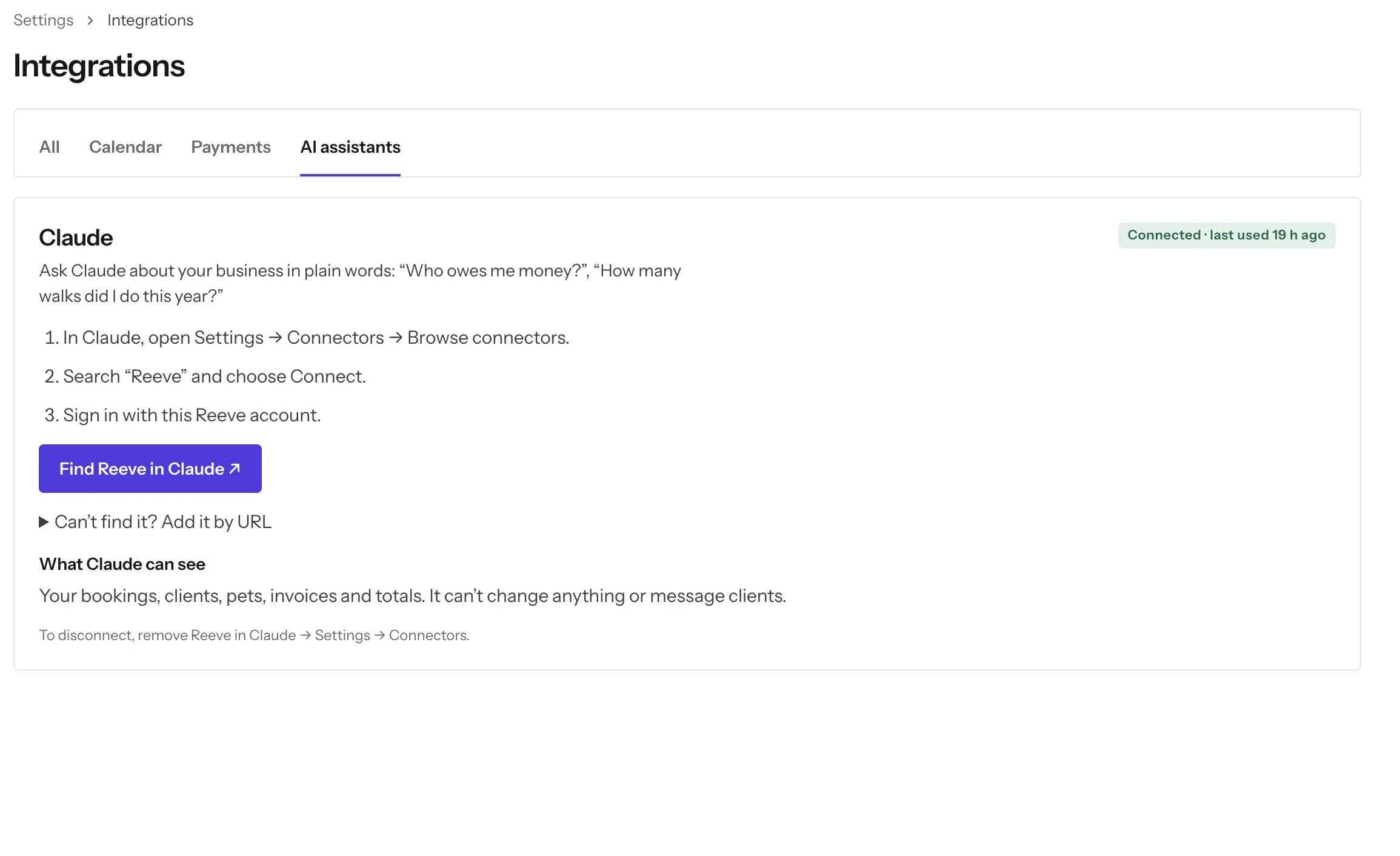
Click Settings in the left-hand bar, then Integrations, then the AI assistants tab. (On the All tab, you can also click Open on the Claude row.) The Claude card says what Claude can do for you. Until you set it up, it says Not connected.
Find Reeve in Claude
Click Find Reeve in Claude. It opens Reeve’s page in Claude’s connectors directory. Then follow the three steps on the card:
- In Claude, open Settings, then Connectors, then Browse connectors.
- Search Reeve and click Connect.
- Sign in with this Reeve account.
Claude’s menus change now and then. If you don’t see Settings, look for Customize, then Connectors.
Can’t find Reeve? Add it by URL
On a Team or Enterprise plan, your organization’s owner may limit which connectors from the directory you can see. You can still add Reeve by its URL. Click Can’t find it? Add it by URL on the card. Under Connector URL you’ll see https://api.reeve.pet/mcp/reeve. Click Copy. Then:
- In Claude, open Settings, then Connectors, then Add custom connector.
- Name it Reeve and paste the URL. Leave the OAuth fields blank.
- Click Connect, and sign in with this Reeve account.
If you don’t see Add custom connector either, ask your organization’s owner to add Reeve.
Ask a question
Start a new chat in Claude and begin with “Using Reeve, …” so Claude knows to look in Reeve rather than search elsewhere. Try:
- “Using Reeve, who owes me money?”
- “Using Reeve, what’s on my schedule tomorrow?”
- “How many walks did I do this year?”
- “How much did I invoice last month?”
- “Who were my top clients this year?”
Claude answers from your live Reeve data, so the answer is as current as your bookings and invoices.
Book, move or cancel a visit
Ask Claude to make a change in plain words:
- “Book Bella’s 30-minute walk Friday at 10.”
- “Book Mango’s boarding from Friday 5pm to Sunday 10am.”
- “Move the Lees’ Thursday walk to 3pm, and let them know.”
- “Cancel Biscuit’s walk tomorrow.”
Claude shows you the change first and waits for your yes. The preview lists the client, pets, service, day, date and time (with your time zone) and the price. It also tells you whether Reeve will message the client. Nothing changes until you say yes. A preview lasts 10 minutes; after that, ask again.
Moving a visit asks whether to tell the client, the same as Let the client know in Reeve. Cancelling an unpaid visit doesn’t message the client, also the same as in Reeve.
If a time is already taken, Claude says which booking it overlaps. If you’ve turned off overlapping bookings, it won’t book over it.
What Claude can and can’t do
Claude can read your bookings, clients, pets, invoices and totals.
Claude can book, move and cancel visits, always after showing you the change and getting your yes.
Claude can’t take payments, refund, or message clients on its own. Some changes are left to Reeve, and Claude tells you so with a link to open there:
- a visit with a payment, deposit or refund on it (so refunds are handled properly);
- drop-in visits and other bookings with more than one visit;
- setting up a repeating booking;
- turning a single visit into an overnight stay, or the other way round.
Check it’s connected
Back on Integrations, then AI assistants, the chip on the Claude card changes from Not connected to Connected with when it was last used, like “2 h ago”. It turns Connected after your first successful question in Claude.
What if it doesn’t work?
When something stops Claude reading your Reeve data, Claude passes on one of these messages from Reeve.
- “You’re signed in, but there’s no Reeve business on this account yet. Finish setting up at https://app.reeve.pet and then ask again.” Your login works, but the business isn’t set up. Finish setting it up at app.reeve.pet, then ask Claude again.
- “Your sign-in belongs to more than one Reeve business. The connector can’t choose between them yet. Use the Reeve app for now.” Claude can’t connect a login that belongs to more than one business yet. Look things up in the Reeve app for now.
- “Reeve’s assistant connector only works with Reeve accounts.” You signed in with a PetProfessionals login. Remove Reeve in Claude, add it again, and sign in with your Reeve login.
- “Your Reeve role doesn’t allow viewing …” The message ends with the part of Reeve your role can’t see, such as bookings or invoices. Ask the Pro who added you to change your role.
- “Your Reeve role doesn’t allow changing bookings.” Your role can view bookings but not change them. Ask the Pro who added you, or make the change in Reeve.
- “Your Reeve account is read-only until billing is sorted out, so Claude can’t change bookings.” Your plan needs attention. Open Reeve to fix billing; Claude can still answer questions meanwhile.
- “That preview has expired (previews last 10 minutes). Ask Claude for it again.” Ask for the change again and confirm the new preview.
- “The price changed from … to … since the preview.” The service’s price changed after you saw the preview. Ask Claude to preview it again so you see the new price.
- “This booking changed since the preview…” Someone changed the booking in Reeve in the meantime. Ask Claude to preview it again.
- “Too many requests. Try again in a minute.” Claude asked Reeve too many times at once. Wait a minute and ask again.
- “Something went wrong on Reeve’s side; nothing was changed. Reference: …” Email admin@reeve.pet with the reference so we can look it up.
If signing in fails, or Claude says Reeve is disconnected, remove Reeve in Claude (Settings, then Connectors), then connect it again with the steps above and sign in with your Reeve login.
Turning it off
Remove Reeve in Claude: Settings, then Connectors. Your Reeve data stays exactly as it is.
What’s next
Connect Google Calendar, or send an invoice and ask Claude who still owes you.
Still stuck?
Email us and a person will help, or book a call and we'll walk through it with you.
admin@reeve.pet