· Product · 4 min read
Ask Claude about your pet business
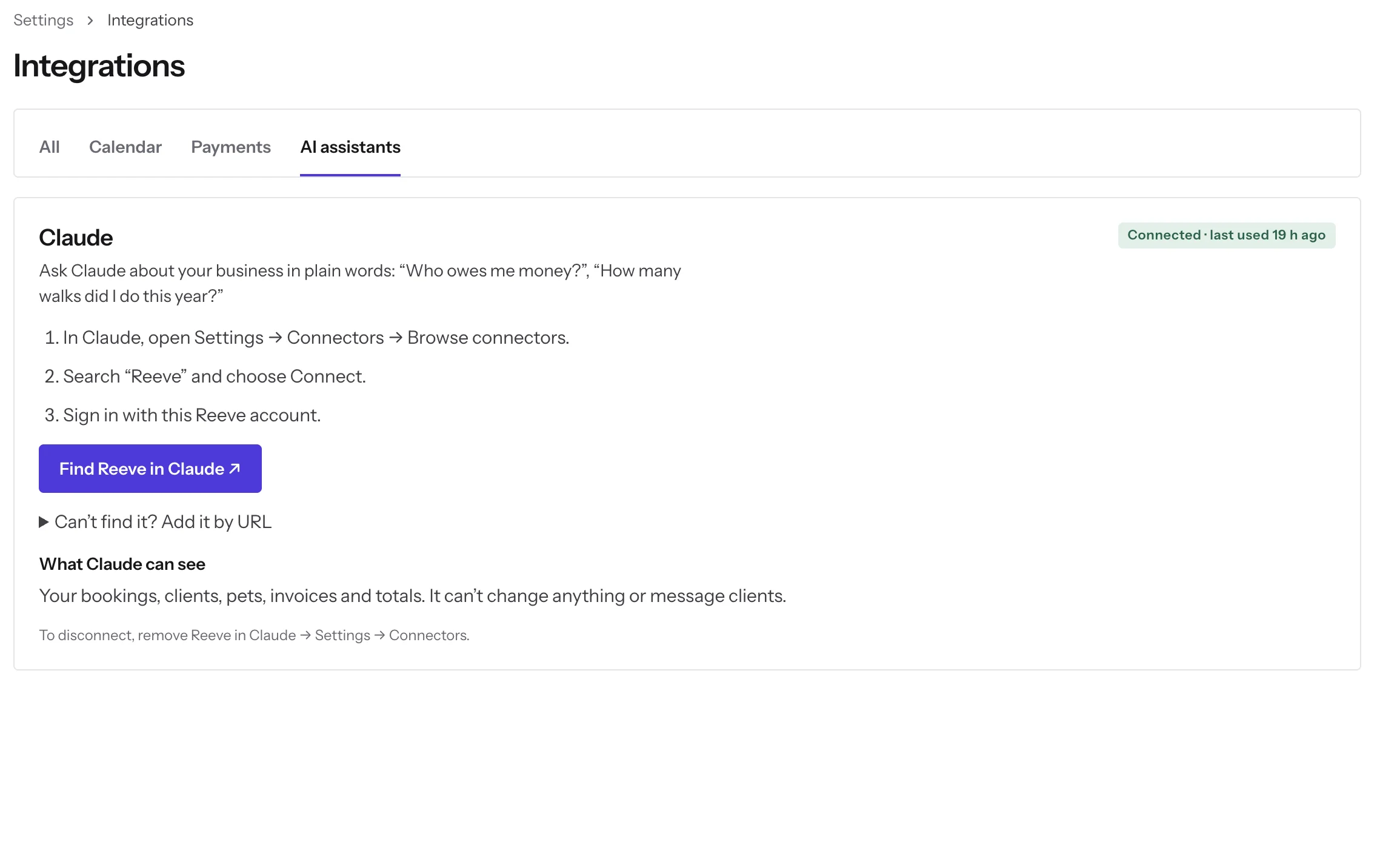
Reeve now connects to Claude, the AI assistant made by Anthropic. Once you set it up, you can ask Claude about your business in plain words, like “Who owes me money?”, and Claude answers from your live Reeve data. You can also ask it to book, move or cancel a visit. Claude shows you the change first and makes it only when you say yes.
Updated 11 November 2026: Claude can now book, move and cancel visits, not just answer questions.
Say a client asks whether they’re paid up, or you wonder if this month was busier than last. The answer is already in Reeve, a few screens and some adding up away. Now you can type the question into Claude and read the answer.
What can I ask Claude about my business?
You can ask about anything Reeve already knows about your bookings, clients and money. These questions work well:
- “Who owes me money?”
- “How many walks did I do this year?”
- “What’s on my schedule tomorrow?”
- “How much did I invoice last month?”
- “Who were my top clients this year?”
- “How did this month compare to last month?”
Claude looks the answer up in Reeve when you ask, so it’s as current as your bookings and invoices. Ask who owes you money and it lists the clients with unpaid invoices, what each one owes and how long it’s been overdue.
Behind the answers is a short set of lookups. Claude can count and list your bookings, list your invoices and the overdue ones, pull a summary of your business, find a client, rank your top clients and list your services.
Start with “Using Reeve, …” the first time, so Claude knows to look in Reeve.
Can Claude book or change visits?
Yes. Ask in plain words:
- “Book Bella’s 30-minute walk Friday at 10.”
- “Book Mango’s boarding from Friday 5pm to Sunday 10am.”
- “Move the Lees’ Thursday walk to 3pm, and let them know.”
- “Cancel Biscuit’s walk tomorrow.”
Claude never changes anything straight away. It shows you a preview first: the client, pets, service, day, date and time, the price, and whether Reeve will message the client. Nothing happens until you say yes. If the time is taken, it tells you which booking it overlaps.
The changes go through Reeve exactly as if you’d made them in the app: the same price, the same calendar sync, the same messages. Moving a visit asks whether to tell the client, just like Let the client know in Reeve.
What can’t Claude do?
Claude can’t take payments, give refunds, or message a client on its own. A visit that already has a payment or deposit on it stays in Reeve, so refunds are handled properly; Claude says so and gives you a link to it. So do drop-in visits and repeating bookings.
Who can see my data?
Each person who connects sees only their own business’s data, with the access their Reeve account already has. Only Reeve businesses can connect.
You sign in with your Reeve account during setup, so through Claude you can’t see anything that account can’t see in Reeve.
How do I connect Claude to Reeve?
Reeve is listed in Claude’s connectors directory. Find it there, click Connect, and sign in with your Reeve account. It takes a few minutes:
- In Reeve, open Settings → Integrations → AI assistants. The Claude card (pictured above) says Not connected until you finish.
- Click Find Reeve in Claude. It opens Reeve’s page in Claude’s directory. You can also search for Reeve under Settings → Connectors → Browse connectors in Claude.
- Click Connect, and sign in with your Reeve account.
Back in Reeve, the card shows Connected and when Claude last used it. Start a new chat in Claude and ask your first question.
If your Claude organization hides Reeve from the directory, open Can’t find it? Add it by URL on the card. It has the connector URL, https://api.reeve.pet/mcp/reeve, and the steps to add it as a custom connector in Claude.
Which Claude plans can use it?
Most Claude plans can. Reeve is in Claude’s connectors directory, and Claude’s help page lists custom connectors on its Free, Pro, Max, Team and Enterprise plans. On Team and Enterprise, the organization’s owner decides which connectors members can add. The details are on Claude’s page about custom connectors.
How do I disconnect it?
Remove Reeve in Claude, under Settings → Connectors. Claude stops reading and changing your Reeve data, and nothing already in Reeve changes.
Try it
Settings → Integrations → AI assistants
15 days free · Card required, your plan starts on day 16 · Cancel anytime · We move your clients for you
Checked on